
ExactPour logo

ExactPour vs spreadsheets

ExactPour vs spreadsheets for bar inventory

Spreadsheets are free, flexible, and familiar. They are also why most bars find variance problems a month too late. Here is an honest breakdown of when each wins.

The short answer

Last updated

If you run a single low-volume bar and your owner is happy doing inventory in their spare time, a spreadsheet can hold the line. Dedicated software becomes worth evaluating when you need timely variance review, POS reconciliation, or multi-location workflows.

Where ExactPour wins

  • Barcode counting removes hand tallying and spreadsheet re-entry
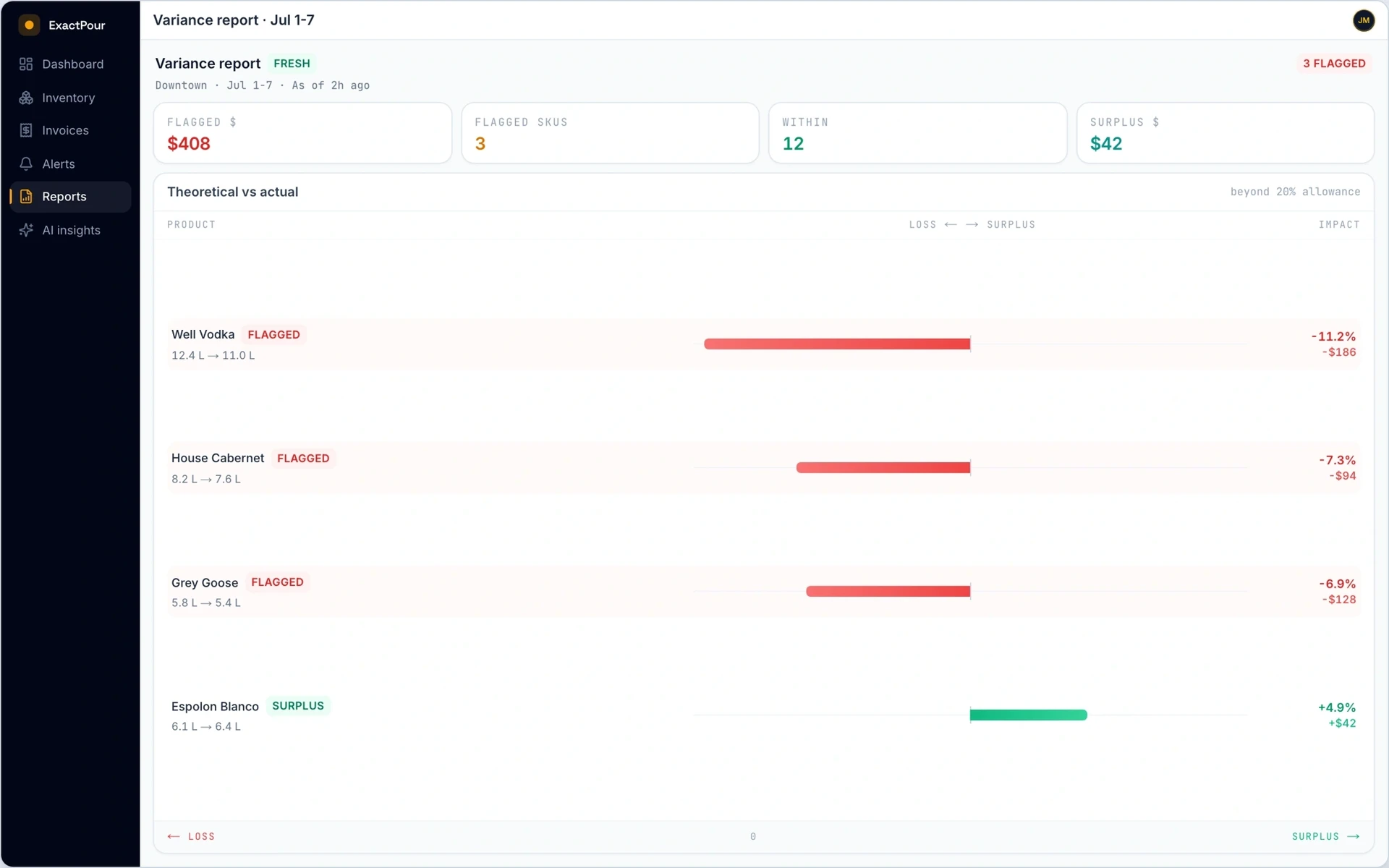
  • Automatic POS reconciliation surfaces variance the morning after, not at month end
  • Per-product variance flags and reason codes turn numbers into actions
  • Invoice OCR keeps bottle pricing current without manual data entry
  • AI briefs, forecasting, and a Profit Recovered scoreboard verified from your counts
  • Invoice price watchdog and price & margin copilot with what-if scenarios

Where spreadsheets may fit better

  • Free, no subscription, no onboarding
  • Infinitely flexible, you can build any report you can imagine
  • No vendor lock-in; the data is yours in a portable format

Feature-by-feature

An honest side-by-side. Where we are not sure, we say so.

  • Cost

    ExactPour
    From $59/mo
    spreadsheets
    Free
  • Barcode scanning

    Spreadsheets cannot scan; you re-key every entry.

    ExactPour
    Yes (phone or USB scanner)
    spreadsheets
    No
  • Partial-bottle fill tracking

    ExactPour
    Yes, 0-1 fill per scan
    spreadsheets
    Manual entry
  • POS reconciliation

    Building projected inventory in a sheet is fragile.

    ExactPour
    POS sync + variance reports (Toast, Square, Clover, GoTab)
    spreadsheets
    Manual / VLOOKUP
  • Variance flagging

    ExactPour
    Automatic, per-product tolerance
    spreadsheets
    Manual review
  • Invoice OCR

    ExactPour
    Yes, from a photo or PDF
    spreadsheets
    No
  • AI insights & forecasting

    ExactPour
    Yes
    spreadsheets
    No
  • Multi-location

    ExactPour
    Built-in
    spreadsheets
    Possible but brittle
  • Time to onboard

    ExactPour
    Minutes
    spreadsheets
    Hours to build the template
  • Profit Recovered scoreboard

    ExactPour
    Yes (verified from counts)
    spreadsheets
    No
  • Invoice price watchdog

    ExactPour
    Yes
    spreadsheets
    No
  • Price & margin copilot + what-if

    ExactPour
    Yes
    spreadsheets
    No
  • Peer benchmarking (opt-in)

    ExactPour
    Yes (k-anonymous)
    spreadsheets
    No

When a spreadsheet is still the honest choice

A spreadsheet wins when the owner is the only counter, volume is low, and nobody needs poured versus sold by tomorrow morning. Excel and Google Sheets are free, portable, and familiar. If you are validating a concept bar with twenty SKUs and you enjoy formulas, stay there until the count starts slipping or a second person has to inherit the file.

The break point is labor plus delay. Re-keying tenths of a bottle, rebuilding VLOOKUPs after a menu change, and discovering shrink at month-end are not free. Time a Sunday count including spreadsheet entry. If that block is longer than a barcode session plus a Monday exception review, the subscription is buying hours and earlier truth, not a prettier logo.

What dedicated software must do that a sheet cannot

Barcode identity, fill levels on open bottles, POS sales mapped to recipes, and a history of who counted which bay. Spreadsheets can store those numbers after you type them. They cannot capture them at the shelf or reconcile Toast, Square, Clover, or GoTab without a fragile export ritual.

ExactPour is built for that capture-to-coaching loop. Start free on a single location, or start the 14-day Pro trial. Nothing is charged unless you add a payment method. Paid plans start at $59/mo. Export CSV whenever you want a custom pivot. The sheet remains a reporting tool. It should stop being the system of record for a working liquor room.

A two-count bake-off against your current workbook

Keep the spreadsheet for one more cycle. Run ExactPour on the same cutoff. Compare minutes, unfinished rows, and whether Monday's unexplained dollars are a ranked list or a hunt. If the sheet wins on your floor, keep it. Trials exist to prevent loyalty to demos.

Watch formula drift. A new cocktail that never made it into the usage tab will make both tools look wrong. Map top sellers first. Then judge the software. Companion reading: the counting guide at /docs/bar-inventory-counting-basics and /bar-inventory-software.

Frequently asked

Is Excel good enough for bar inventory?

Excel can store counts, but barcode input, POS reconciliation, and per-product variance review require additional tooling or custom work. Evaluate dedicated software when those workflows matter to your operation.

How can I compare counting time with a spreadsheet?

Time the same representative count in both workflows. ExactPour removes hand tallying and spreadsheet re-entry, but the result depends on your inventory, layout, hardware, and team.

Can I export my ExactPour data to a spreadsheet?

Yes. Every ExactPour report exports to CSV so you keep full ownership of your data and can build any custom analysis you want in Excel or Google Sheets.

Talk with ExactPour

See ExactPour next to spreadsheets

Book a 20-30 minute walkthrough. Bring your current workflow. We will count, reconcile poured vs sold, and show pour cost on a live bar.

14-day trial available · No credit card · Typical reply within one business day

Start tonight

Stop guessing where
your liquor money went.

Run ExactPour on your own bar for two weeks. See the leaks, the over-pours, and the dollars you can still save.

14 days free · No credit card · From $59/mo

ExactPour vs Spreadsheets: Bar Inventory | ExactPour